Language barriers create real obstacles in business, travel, and daily interactions, but artificial intelligence now offers practical solutions that work in the moment. This article examines twelve specific ways AI-powered tools help people communicate across languages, from reading foreign signs instantly to holding real-time customer conversations. Industry experts share their experiences with these technologies and explain which approaches deliver the most reliable results.
- Decode Signs And Labels Instantly
- Hold Real Time Talks With Customers
- Adapt Tone For Cultural Respect
- Resolve Specs Precisely Across Languages
- Read Timetables With Onscreen Overlay
- Switch To Simple Sentences In Conversation Mode
- Draft Replies And Verify Alignment With Humans
- Bridge Urgent Needs With Voice Chat
- Practice Key Phrases To Build Rapport
- Swap Short Messages With Audio Translator
- Use Live Transcripts For Clarity
- Find Items With Visual Assistance
Decode Signs And Labels Instantly
On a recent Women Travel Abroad trip to Morocco I used Google Translate’s camera feature to communicate with locals who did not speak English. I opened the app, pointed my phone at Arabic price tags and ingredient lists, and received real-time translations overlaid on my screen. In Fes a traveler used the camera to translate a handwritten note from a local artisan about his pottery techniques, which turned a shopping stop into a genuine cultural exchange. It also helped with safety and navigation by translating street signs, transport schedules, and medication labels when needed, and I recommend downloading the offline language pack before you travel.

Hold Real Time Talks With Customers
As the founder of ThisFix Computer Services here at thisfix.co.uk, one of the best ways AI has helped me in day-to-day work is communicating with local customers who don’t speak much English.
We get a fair few Polish, Romanian, or other Eastern European folks coming in for laptop/PC fixes, upgrades, or virus removals—great customers, but language can be a barrier when explaining what’s wrong with their slow machine, what the repair will cost, or how long it’ll take.
A few months back, a guy came in with a laptop that wouldn’t boot, and he spoke very little English—mostly gesturing at the black screen and saying a few words. I pulled out my phone, opened Google Translate, switched to Conversation mode (the one where it listens back-and-forth in real time), set it to English on my side and Polish on his. I spoke normally: “Can you tell me what happened before it stopped working?” The app picked up my voice, translated it instantly to Polish audio and text on screen, and he replied in Polish—the app translated it back to English for me to hear and read. We went back and forth like that for a good 10 minutes: he described dropping it, I asked about any error messages, explained it’d need data recovery and possibly a new drive, quoted the price, and he understood everything clearly enough to agree and leave the laptop with us.
It was seamless—no awkward pointing at Google images or writing notes. The real-time voice translation meant we kept eye contact, he could hear the Polish version naturally, and I got accurate English back without delays. Google Translate’s live conversation feature (with auto-detect sometimes kicking in) made it feel like a proper chat instead of a struggle.
Without that tool, I’d have had to call a friend who speaks Polish or risk misunderstandings that could lead to wrong fixes or unhappy customers. It’s simple, free on my phone, works offline for some languages if you download packs, and it’s saved me loads of time and hassle with non-English locals in the Northwich/Lostock Gralam area.
Now I keep it ready whenever someone seems to be struggling with English—it’s become part of how I run ThisFix to make sure everyone gets good service no matter their language.

Adapt Tone For Cultural Respect
I was trying to sort out a small but frustrating issue with a local shop owner—something about a delivery mix-up. He didn’t speak English, I didn’t speak his language, and the usual back-and-forth with basic translation apps wasn’t getting us anywhere. The sentences were technically correct, but the tone felt off… a bit too direct, almost transactional. You could feel the tension building.
So I tried something slightly different. Instead of just translating my message, I used an AI tool (ChatGPT with voice + translation) to rewrite what I wanted to say in a more culturally appropriate, polite tone before translating it.
For example, instead of “This item is wrong, can you fix it?” it reshaped it into something closer to: “I might have misunderstood, but I think there’s a small issue with this—could you help me check?” Then translated that.
That small shift changed everything.
His response softened immediately. He started explaining more, even smiling a bit, and we resolved it in a few minutes. Same issue, same people—but a completely different outcome just because the intent came through more clearly.
The feature that made the biggest difference wasn’t just translation—it was the ability to adjust tone and context before translating. Almost like having a cultural buffer built into the conversation.
What most people don’t realize is that language barriers aren’t just about vocabulary. They’re about expectations—how direct you’re “allowed” to be, how you show respect, how you signal uncertainty. AI can bridge that layer in a way traditional translation tools never really did.
If there’s one takeaway, it’s this: don’t just ask AI to translate what you said. Ask it to translate how you should say it in that context. That’s where it stops feeling like a tool and starts feeling like a guide.

Resolve Specs Precisely Across Languages
As CEO and designer of Mim Concept, I often work with suppliers and makers across languages, and because I have lived in Vietnam, Australia, and Canada, I know how easily polite confusion can be mistaken for agreement. On a sourcing trip in Vietnam, I used AI voice translation and camera translation on my phone to speak with a small workshop team about timber finishes, dimensions, and packaging details when their English was limited. The biggest advantage was context. I could scan handwritten notes, translate labels on sample boards, then use voice mode to ask follow-up questions in real time instead of simplifying everything down to yes or no. In one meeting, we caught a measurement mismatch that would have affected an entire production run and resolved it in under 20 minutes. AI was useful because it made the conversation precise. When people stop guessing what you mean, the quality of the relationship improves almost immediately.

Read Timetables With Onscreen Overlay
During one trip we needed help understanding a train schedule that only appeared in the local language. We opened Google Lens and scanned the timetable directly with the camera. The tool instantly translated the text while keeping the structure of the board visible. That small feature allowed us to confirm departure times without asking multiple people.
What made the experience powerful was how naturally the interaction unfolded afterward. Once we understood the schedule we could ask locals simple follow up questions. They could point to the board while the translation remained on our screen. AI quietly removed the initial barrier and made the conversation possible.

Switch To Simple Sentences In Conversation Mode
I was in Bangkok last year working on a content project with a local agency partner. Their English was good, but we were having issues with technical SEO ideas that don’t easily translate.
Google Translate’s conversation mode was a lifesaver. You press the mic button and speak. It translates to Thai. They respond. You press the button again and it translates back to English. But how does it do that? Well, I discovered that speaking in simple sentences works. Speak in simple sentences only. Avoid idioms. Avoid complex thoughts.
Instead of saying “We need to optimize the title tags to improve click-through rates from the SERPs,” I said “Change the page titles. More people will click from Google search results.” That worked beautifully.
The camera feature was also great when reviewing their content briefs in Thai. You point the camera at the text. It shows you the translation in real time. Not perfect, but good enough to know when they got the requirements wrong.
The lightbulb moment came when their developer was explaining a technical problem by pointing at his screen and speaking in Thai to Google Translate. I was able to see the problem and hear the solution at the same time. We fixed a crawl error that blocked 200 pages in about ten minutes.
Simple tools used correctly can solve problems that fancy tools used incorrectly can’t.

Draft Replies And Verify Alignment With Humans
Yes. For example, when meeting with local partners who did not speak my language, I used translation services such as Google Translate and DeepL to gain a basic understanding of written messages and to draft simple replies. I relied on those tools to identify the core points in emails and messages so I could respond in a timely way. After forming a draft with the tools, I sent concise follow-up summaries in plain language to confirm that both sides were aligned. That verification step reduced misunderstandings and clarified next steps. For complex negotiations I escalated to bilingual team members or professional translators. Using the translation tools for initial outreach made meetings more efficient and helped maintain clear records of agreements. At Kualitatem I encourage teams to use these tools for quick, initial communication while validating important details with human translators to balance speed and accuracy.

Bridge Urgent Needs With Voice Chat
Last summer I traveled from the US to Guyana where I was born for a family gathering. Guyana is the only English speaking country in South America. Given that I am a native english speaker, I didn’t anticipate the need for any translation services.
However, Guyana has become one of the biggest oil producers in the Western Hemisphere which has attracted a substantial amount of new migrants from China who have set up dry goods shops, grocery and convenience stores.
One night I was caught in a citywide power outage and had to communicate with shop owners who did not have the vocabulary for the items I was seeking. I used the voice feature of ChatGPT app on my phone to have an oral translated conversation between me and the employees.
That bit of AI literacy was a lifesaver.

Practice Key Phrases To Build Rapport
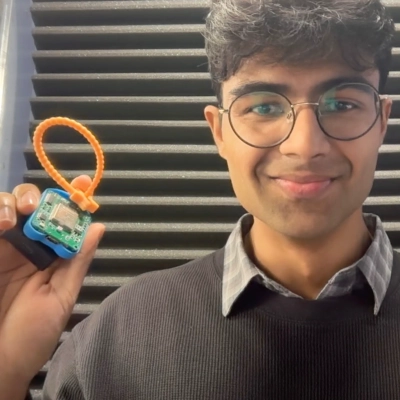
On a recent sourcing trip to Bangkok, my team and I needed to communicate with a few PCB component suppliers in Thai, not exactly a language most of us had handy. We used our own AI language device to prepare, practicing conversational Thai in the days leading up to the meetings. It made a real difference in building rapport with suppliers who appreciated the effort. We learnt the basics pretty quickly: Sawasdee, Chai, Mai, and the respectful kha/khrap at the end of speech, etc.
The fun meta-detail: at ElatoAI, we make a screen-free device to practice conversations in over 70 languages with OpenAI and Gemini voice models, so this was very much a “dogfooding” moment for us. But honestly, it’s one thing to build a product and another to actually rely on it when a business relationship is on the line.
Swap Short Messages With Audio Translator
One experience happened while bargaining in Istanbul’s Grand Bazaar years ago. The shopkeeper spoke limited English but wanted to describe product details carefully. We used the Microsoft Translator voice feature to exchange short messages. Each spoken sentence appeared translated on the phone screen.
The conversation suddenly became relaxed and almost humorous for both sides. We laughed watching the phone interpret our bargaining attempts. The seller appreciated the effort and shared stories about his shop. Technology helped transform a negotiation into a friendly cultural moment.

Use Live Transcripts For Clarity
We relied on AI transcription tools during a local market visit where conversations moved quickly. We opened Otter.ai and used its live transcription combined with quick translation. The app captured spoken phrases and converted them into readable sentences on the screen. That allowed us to follow along even when pronunciation felt unfamiliar.
What stood out was how this slowed the conversation in a helpful way. Locals could see the text appear and sometimes corrected the translation themselves. That shared moment created a more collaborative exchange. AI did not replace human interaction but made it easier for both sides to understand each other.

Find Items With Visual Assistance
One of the most useful ways AI helped me with locals who did not speak my language was that it reduced the need for the conversation in the first place. I used ChatGPT’s image input, took a photo of a supermarket aisle, and asked where the dish soap was. It picked out the right section accurately enough that I could just walk over and grab it. That made me realise AI is not only useful for translation, but also for removing friction when you are trying to solve a simple problem quickly.